
Managing comments on Facebook is essential, especially if you’re running a business page, moderating a public profile, or working in a regulated industry where comment control is crucial. Whether you want to hide negative feedback, prevent spam, or ensure compliance, Facebook provides several tools to manage comments effectively.
Why hide comments on Facebook?
Hiding comments on Facebook isn’t about silencing your audience but about maintaining a professional and positive space. For businesses, content creators, and regulated industries, controlling what appears on your posts helps manage brand reputation, avoids unwanted controversies, and keeps your content compliant with industry standards. Let’s get into the steps to do it right.
Step-by-step guide to hiding comments on Facebook (on post):
While Facebook doesn’t officially offer an option to completely disable all comments on posts, there is a workaround that effectively limits who can comment, giving you more control. Here’s how you can do it:
1. Open Facebook post
- Step 1: open the Facebook app or website
- Step 2: navigate to your profile or business page where the post is located.
2. Restrict comments on FB post
- Step 1: click on the three dots (find the three dots (ellipsis) on the top right corner of the post to open the post settings)
- Step 2: from the dropdown menu, select the option that says “Who can comment on your post?”
- Step 3: among the options, select “Profiles and Pages you mention.” This setting allows only the profiles and pages you’ve specifically mentioned in the post to comment. If you don’t mention anyone, effectively, no one can comment.
- Step 4: save your settings by clicking “Done.” Your post is now restricted, and comments are limited only to those profiles and pages you’ve mentioned.
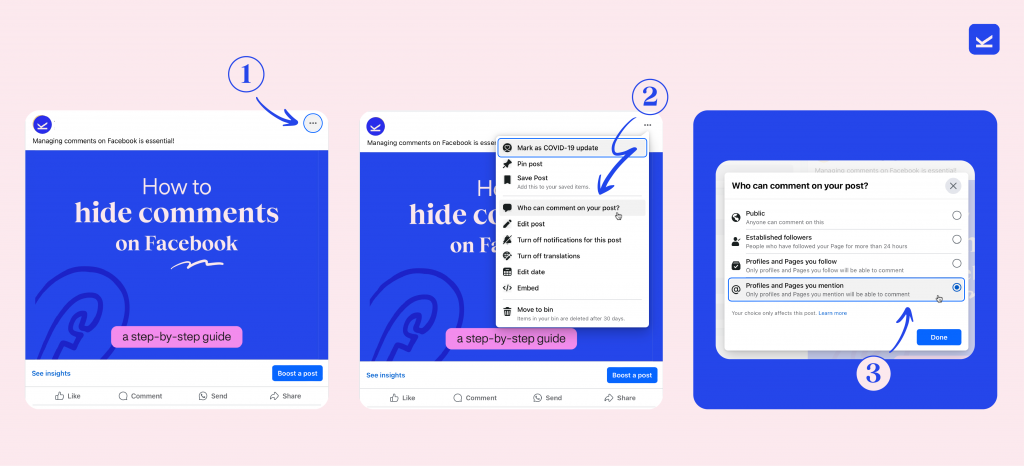
Step-by-step guide how to hide a specific comment on a FB Post:
If (or when…) you come across spam, negative feedback, or inappropriate comments that you don’t want to be visible to others but don’t necessarily want to delete outright. Here’s how you can hide a specific comment under your post:
1. Open Facebook post and find the comment
- Step 1: open the Facebook app or website
- Step 2: navigate to your profile or business page where the post is located.
- Step 3: scroll through the comments until you find the one you want to hide.
2. Hide comments on post
- Step 1: click on the three dots (next to the comment, you’ll see three dots (ellipsis). Click on them to open the comment management options)
- Step 2: from the dropdown menu, choose “Hide comment.” The comment will still be visible to the person who posted it and their friends, but it will be hidden from everyone else.
How to unhide comments if necessary? If you accidentally hide a comment or change your mind, simply repeat the steps and select “Unhide comment” from the menu.
Extra pro tips for managing facebook comments effectively
- Set up moderation rules, by using Facebook’s keyword filters to automatically hide comments containing specific words or phrases, saving you time and keeping your page clean.
- Report or ban if necessary. If a comment violates Facebook’s community standards, you can report it. If someone repeatedly posts inappropriate comments, you can ban them from your page.
Managing your or your client’s comments might seem minor, but it’s crucial, especially when working with clients. Mastering these steps ensures that you never look unprepared, maintaining your professional edge. And for those looking to streamline their social media management, Kontentino provides tools to schedule, review, and optimize content, making your job easier and your strategy more effective.