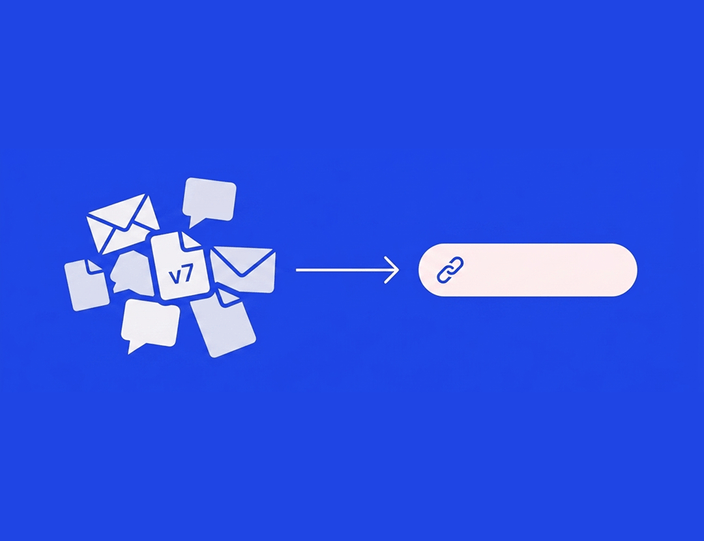
Social media management is 20% creativity and 80% chasing people for approvals. If your “approval workflow” is currently a 14-email thread, a shared spreadsheet, and a Trello board held together with hope, you already know the problem. Posts stall. Feedback gets lost. Someone publishes final_v2_REAL_final.jpg and it’s the wrong one.
This guide compares the 8 best social media approval tools in 2026 – the ones with real, built-in approval workflows, not just a scheduler with a comment box. We’ll be honest about where each tool wins, where it falls apart, and which kind of team each one actually fits.
The 8 best social media approval tools at a glance
G2 ratings and pricing last verified: July 2026. Always check the live pricing page before you buy – this category changes fast.
| Tool | Best for | Client sign-off | No-login approval | Multi-level workflow | Approvals from | G2 rating |
|---|---|---|---|---|---|---|
| Planable | Best pure approval interface | ✅ Built in | ✅ Guest access | ⚠️ Enterprise only | Every plan (multi-level gated) | 4.6 (1,017) |
| Kontentino | Agencies & multi-brand teams | ✅ Built in | ✅ Shareable link, no login | ✅ Every paid plan | Internal from Starter, client from Standard | 4.7 (217+) |
| Loomly | Structured content workflow | ✅ Built in | ⚠️ Limited | ⚠️ Workflow states, not chains | Starter | 4.6 (1,794) |
| Agorapulse | Approval + community inbox | ✅ Built in | ✅ Shared calendars | ⚠️ Custom plan only | Professional ($119+/user/mo) | 4.5 (968) |
| SocialPilot | Budget teams with light approvals | ✅ Built in | ✅ Client link | ❌ Fixed 2 levels | Client stage on Premium ($85/mo) | 4.5 (841) |
| Hootsuite | Enterprise breadth | ✅ Built in | ❌ Seats required | ⚠️ Advanced+ | Advanced ($399/user/mo) | 4.3 (6,693) |
| Sprout Social | Enterprise analytics + approvals | ✅ Built in | ⚠️ External approvers capped | ✅ Higher tiers | External approvers on Advanced | 4.4 (4,134) |
| Buffer | Solo creators & small teams | ⚠️ Team review, not client-facing | ❌ | ❌ Single step | Team plan | 4.3 (1,024) |
What actually makes a social media approval tool
Plenty of schedulers claim “collaboration features.” That usually means a comment box. A real social media approval tool is built around the work that happens between content being created and content going live. Before you compare tools, here’s what to look for – and why each piece matters. (New to the concept? Here’s a quick primer on what an approval workflow involves.)
Built-in client sign-off
The approval decision should live where the content lives. If your client approves a post in an email but the post sits in a scheduler, you’ve created a gap – and gaps are where wrong versions get published. Look for a tool where the client sees the actual post, clicks approve or requests changes, and the post’s status updates instantly for everyone. No copy-pasting screenshots into Outlook.
No-login, email-link approvals
This one quietly decides whether your approval workflow works at all. Clients do not want another password. The best tools generate a shareable link – the client opens it on their phone, sees the posts exactly as they’ll appear, and approves with a tap. No account, no login, no “I couldn’t get in so I just replied here.” If a tool requires every client contact to become a paid seat just to click approve, that’s a pricing problem disguised as a security feature.
Multi-level workflows (internal → client)
Most agency content passes through at least two gates: an internal review (copy check, brand check, “did we spell the client’s name right”) and then client sign-off. Some teams add a third – legal, a senior strategist, a brand manager on the client side. A real approval tool lets you chain these stages so a post can’t reach the client until it’s cleared internal review, and can’t be scheduled until the client approves. Tools with a single approve/reject button force you to run the internal round somewhere else, which defeats the point. If you manage several clients, this matters even more – see how Kontentino handles multi-client management for agencies.
Version history and audit trails
When a client says “that’s not what I approved,” you need receipts. Version history shows every edit to a post; an audit trail shows who approved what, and when. For most teams this is a sanity feature. For teams in finance, healthcare, or anything regulated, it’s a requirement.
Automatic reminders
The number one approval bottleneck isn’t disagreement – it’s silence. The post sits in “waiting for client” for four days because the client forgot. Good approval tools send automatic nudges: “You have 3 posts waiting for review.” That single feature is the difference between chasing clients and getting client approval on time.
Live post previews
Clients should approve what they’ll actually see – the cropped image, the truncated caption, the way the carousel swipes. Pixel-accurate previews per platform prevent the most demoralizing feedback loop in agency life: the client approves a mockup, sees the live post, and asks why it looks different.
Multi-client workspaces
If you’re an agency, every client needs their own space – their own calendar, their own approvers, their own assets – without their content (or their pricing) leaking into another client’s view. Watch how each tool charges for this: some price per workspace, per user, or per profile, and the same tool that’s cheap for one brand can be brutal for ten.
Approval tool vs. email, spreadsheets & Trello: what you actually lose
Let’s be fair: you don’t need approval software on day one. If you run one brand, post twice a week, and your “client” is your co-founder sitting next to you, email is fine. A spreadsheet is fine. Honestly.
The problems start with volume and stakeholders. Here’s the honest math on each workaround:
Email approvals. Every post becomes a thread. Every revision forks the thread. Version 3 gets approved but version 4 gets scheduled, because the approval and the content live in two different systems. There’s no status view – to know what’s approved, you re-read your inbox. Our own G2 reviewers describe exactly this before switching: review titles like “Monthly approvals stopped living in my inbox” and “Finally stopped losing client feedback in emails” are the pattern, not the exception. Multiply 15 posts a month by 4 clients by 2 revision rounds and you’re managing 120+ email decisions with no system of record.
Spreadsheets. Better than email – at least there’s a status column. But the sheet describes the post; it isn’t the post. The client approves a row of text, not the visual they’ll see live. Links rot, captions get edited in the sheet but not in the scheduler (or vice versa), and there’s no version history – someone overwrites a cell and the old copy is simply gone. A spreadsheet also can’t remind anyone of anything.
Trello (and general project boards). Boards are genuinely good at status. What they lack is everything else: no platform-accurate preview, no publishing connection (approved cards still have to be manually rebuilt in a scheduler – a re-typing step where errors sneak in), and client access means inviting clients into your board, where they can see more than you’d like. Trello knows a card moved to “Approved.” It doesn’t know which version of the caption was on the card at the time.
The common thread: in all three, approval and publishing are separate systems, and the handoff between them is where mistakes live. A dedicated approval tool collapses them into one – the thing that gets approved is the thing that gets published, automatically, with a record. For where approvals fit in the bigger picture from brief to publish, see how collaboration works in Kontentino.
When is a dedicated tool actually worth paying for? Our rule of thumb: two or more of the following – more than one client or brand, more than ~20 posts a month, more than one approval stage, or any compliance requirement. Hit two, and the tool pays for itself in un-chased approvals alone.
1. Planable: Best pure approval interface

If you judge approval tools purely on the approval experience, Planable is the benchmark. The whole product is built around content review: pixel-perfect feed previews across 9 networks, in-context comments right on the post, and four approval workflow types – none, optional, required, and multi-level – so you can match the process to each client’s fussiness. Guest access means clients can review without becoming paid users. Third-party reviewers consistently call Planable’s approval UX best-in-class, and we’re not going to pretend otherwise. It holds a 4.6 on G2 across 1,000+ reviews.
The structural catch is the pricing model. Planable charges per workspace – one workspace per brand or client, at roughly $33–$49 each per month depending on tier. One brand? Great value. Ten clients on the Pro tier? You’re near $490/month before add-ons – and analytics (~$14/workspace) and the social inbox (~$9/workspace) are paid add-ons, also multiplied per workspace. Monthly post limits (60 on Basic, 150 on Pro) count each network as a separate post, so a single piece published to four platforms burns four posts from your quota. And the multi-level approval chains agencies actually need are gated behind custom-priced Enterprise plans. Pricing is the #1 complaint theme in Planable’s own G2 reviews. (Pricing last verified: July 2026.)
Pricing: No free plan (free trial available). Basic and Pro tiers priced per workspace per month; Analytics and Inbox are per-workspace add-ons; multi-level approvals on Enterprise.
The catch: The approval experience is superb for one brand – and the per-workspace math punishes you for every client you add.
Best for: Single brands and small multi-brand teams that want the smoothest possible review experience and don’t need multi-level chains on a budget tier.
Looking at Planable but running an agency? Kontentino covers the same approval ground with flat plans, and Loomly offers a structured workflow at a lower entry price. Here’s our detailed Kontentino vs. Planable comparison.
2. Kontentino: Best for agencies and multi-brand teams that need approvals without upgrading

Kontentino is the social media management tool teams move to when the work around the post – approvals, internal feedback, client sign-off – starts taking longer than the post itself. It’s built for agencies and in-house marketing teams who manage multiple brands and want approvals, collaboration, and scheduling included from the first paid plan. No tier-gating. No per-seat surprises.
What that looks like in practice
- Multi-level approval workflows on every paid plan: Internal approvals from Starter, client-facing approvals from Standard – chain internal review → client sign-off (→ legal, if you need it). On most tools in this list, multi-step chains are the thing locked behind the top tier or a sales call.
- No-login client approvals: Clients get a link, see live previews of the actual posts, and approve or comment from any device – no account, no password, no seat charge. It’s the fix for the “my client won’t log into anything” problem.
- Automatic reminders: Kontentino nudges whoever’s sitting on an approval, so you don’t have to. Chasing becomes the tool’s job.
- Version history on every post: Every edit and every approval is recorded, so “that’s not what I approved” conversations take thirty seconds, not thirty minutes.
- Predictable flat pricing: Plans bundle users and profiles instead of charging per seat or per workspace, so your bill doesn’t multiply every time you win a client. See the full breakdown on our pricing page.
The pains this actually solves
Remember the email problem from earlier? This is where it goes away. The post, the feedback, the version history, and the approval all live in one place, so the thing the client approves is the thing that gets scheduled. One of our agency users describes their whole flow in a sentence: “I create posts, brief the designer via comments, we go back-and-forth in the chat, then it moves to internal approval and then the client.” That’s the internal → client chain, running without a single email.
The no-login link handles the stakeholder problem. Client-side approvers are often busy marketing directors or founders who will not adopt your software. They will, however, tap a link. As one customer put it: “The chat box for client approvals makes the process so much easier.” Another, on mobile approvals: “I was literally sitting on the beach checking the message… and approved it.” When approving takes ten seconds on a phone, approvals stop being the bottleneck.
And the silence problem – posts stuck in “waiting” – is what automatic reminders and the status calendar exist for. You can see the pattern in what our reviewers title their own G2 reviews: “Finally stopped chasing clients for approvals.” “No more guessing what each client approved.” “Our team no longer waits for approvals.” “Clear approvals without constant follow-ups.” We didn’t write those headlines; agencies drowning in follow-up emails did.
Stop gating features. Start shipping content. Approvals and collaboration are included from the first paid plan. Try Kontentino free for 14 days – no credit card required – or book a 30-min demo.
Pricing: From €49/month (Starter, internal approvals). Client and external approvals from €109/month (Standard). Users and profiles bundled per plan – no per-seat or per-brand add-ons. Full details on our social media approval tool page.
Ratings: 4.7 on G2 · 4.7 on Capterra · trusted by 4,000+ brands.
The catch: Kontentino isn’t the cheapest tool on this list. If your daily work is “schedule a post and walk away” with no review step, you can probably get away with a simpler tool. We win on the work that happens between content being created and going live. If that’s not your workflow, we’re not the right fit.
Best for: Agencies and in-house teams managing multiple brands with multi-level approval needs and a preference for predictable pricing.
3. Loomly: Best for structured content workflows

Loomly approaches approvals through structure. Every post moves through defined workflow states – draft, pending approval, requires edits, approved, scheduled – with commenting and post-idea suggestions built around the process. For teams who want a guided, tidy content pipeline (and brand guidelines stored in-app), it’s genuinely pleasant, and its 4.6 rating on G2 across 1,700+ reviews reflects a well-liked product. Approval states are available from the entry tier, which is more generous than most.
The caution is what’s happened around the product. Loomly was acquired by Bending Spoons in January 2025, and the pricing restructure that followed collapsed five tiers into three – leaving a roughly $200/month gap between Starter (~$49/month annual) and Beyond (~$249/month annual), with long-time customers publicly reporting steep forced migrations. Support quality complaints have grown in the same period. The workflow states themselves are also linear rather than configurable multi-approver chains – fine for one internal reviewer plus a client, limiting for anything more layered. (Pricing last verified: July 2026.)
Pricing: No free plan; free trial available. Starter (~$49/month annual, 3 users, 12 accounts), then a large jump to Beyond (~$249/month annual). Workflow details on Loomly’s features page.
Hint: Loomly’s mid-tier plans disappeared in the 2025 restructure, so growing teams face a $200/month cliff. Kontentino’s plans step up gradually, with approvals on every one of them – no cliff to fall off. See the full Kontentino vs. Loomly comparison.
The catch: The product is solid, but the post-acquisition pricing cliff and support changes make it a riskier bet for growing teams than it was in 2024.
Best for: Small teams that want a structured, guided content workflow with approval states on the entry plan – and don’t expect to outgrow Starter’s limits soon.
4. Agorapulse: Best for teams that need approvals plus serious community management

Agorapulse’s superpower isn’t approvals – it’s the inbox. If your team lives in comments, DMs, and mentions, its unified inbox with assignments and moderation rules is among the best in the category, and reviewers consistently rank its support team as a genuine differentiator. It holds a 4.5 on G2 from roughly 970 reviews. Shared calendars let external stakeholders review scheduled content, so client sign-off is possible without a full seat.
For an approval-first buyer, though, read the packaging carefully. Approval workflows require the Professional plan (~$119+/user/month annual), and multi-step approval chains are only available on the sales-quoted Custom plan – the Standard tier has no approval workflow at all. Combine that with per-user pricing (every team member pays full plan price) and a 10-profile cap with ~$15/profile/month beyond it, and a five-person agency that mainly wanted approvals is paying for a lot of inbox. (Pricing last verified: July 2026.)
Pricing: Free plan for one user. Paid tiers priced per user per month; approvals from Professional; multi-step approvals on Custom (contact sales). Approval feature details in Agorapulse’s help center.
The catch: The features approval-focused teams need sit two tiers and one sales call away, and per-user pricing compounds as your team grows.
Best for: Teams where community management is the primary job and approvals are the secondary one – not the other way around. If it’s the other way around, here’s our Kontentino vs. Agorapulse comparison.
5. SocialPilot: Best budget option with basic client approvals

SocialPilot has earned its “value king” reputation honestly: it’s a capable, bootstrapped-grown scheduler with bulk CSV scheduling that agencies on tight budgets genuinely love, rated 4.5 on G2 across 840+ reviews. It does offer a real client approval flow, including a client review link – which is more than most tools at its price point can say.
The approval structure, however, is fixed at two levels: content scheduler → manager → (optionally) client. There’s no configurable multi-step chain, and the client approval stage specifically is gated to the Premium plan (~$85/month annual) – a doubling of cost for teams whose only gap was client-facing review. The advertised entry price (~$25.50/month annual) is also best read as a starting point: exceeding your tier’s account cap costs ~$4/account/month and extra users ~$5/user/month, so agency-scale bills quietly grow past the sticker. Worth knowing too: SocialPilot was acquired by group.one in mid-2025, so watch pricing announcements. (Pricing last verified: July 2026.)
Pricing: No free plan; free trial available. Essentials from ~$25.50/month annual (1 user, 7 accounts, no approvals); client approval stage on Premium (~$85/month annual). More details you can find on SocialPilot’s features page.
The catch: Approvals top out at two fixed levels, and the client stage lives on the plan that costs three times the one you came for.
Best for: Budget-conscious freelancers and small agencies with high posting volume and a simple manager-then-client sign-off. See how Kontentino compares to SocialPilot.
6. Hootsuite: Best for enterprise breadth

Hootsuite is the tool everyone’s heard of, and the breadth is real: scheduling, analytics, inbox, AI writing, benchmarking, and social listening in one platform, backed by the category’s largest review corpus – 4.3 on G2 from 6,600+ reviews. For enterprises that want one vendor for everything social, including listening, it remains the default shortlist entry, and its approval workflows on higher tiers handle team-based review at scale.
The friction for approval-first buyers is packaging and price. The Standard plan starts at $199/user/month with a 10-account cap, and the structured approval workflows live on Advanced ($399/user/month) and up. There’s no lightweight, no-login client approval path – reviewers external to your organization consume seats. G2 reviewers recurringly cite pricing jumps, account caps, and upgrade pressure; if your core problem is “get client sign-off faster,” you’d be buying a listening-and-analytics suite to solve a workflow problem. (Pricing last verified: July 2026.)
Pricing: No free plan; free trial available. Standard from $199/user/month (10 accounts); approval workflows on Advanced ($399/user/month) and Enterprise. Overview on Hootsuite’s plans page.
The catch: You pay for the whole enterprise suite to get the approval workflow, and clients need seats to participate.
Best for: Enterprises that need listening, benchmarking, and governance in one contract – with approvals as one feature among many. See how Kontentino compares to Hootsuite.
7. Sprout Social: Best enterprise analytics with structured approvals
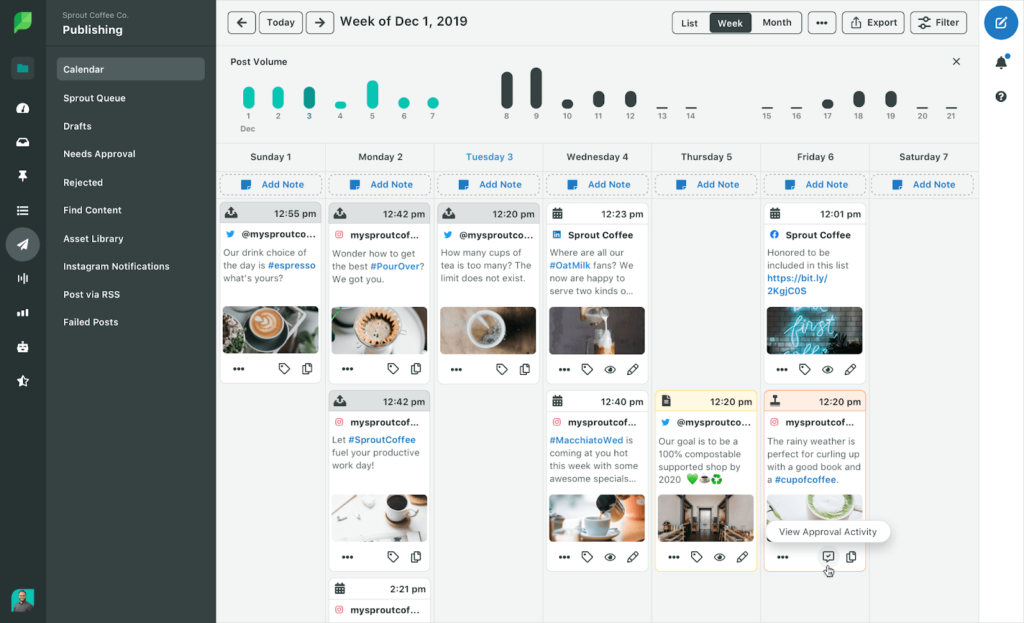
Sprout Social is the analytics benchmark of this list. Its reporting depth, premium support, and polished UX explain the 4.4 rating on G2 across a massive 4,100+ reviews, and its message approval workflows are genuinely well-built for internal team review at enterprise scale – including multi-step flows on higher tiers.
The economics are the story. Sprout charges per seat, from $199 to $399 per user per month, billed annually – a ten-person team on the mid tier runs well into five figures per year. External client approvers are paywalled to the $399/seat Advanced tier and capped at three, which for a multi-client agency is close to disqualifying. Trustpilot sentiment (1.9/5 at last check) skews heavily toward billing and auto-renewal complaints, a pattern worth reading up on before signing an annual contract. (Pricing last verified: July 2026.)
Pricing: No free plan; free trial available. Standard, Professional, and Advanced tiers priced per seat per month, billed annually; external approvers on Advanced only. Details on Sprout’s pricing page
Hint: Sprout caps external client approvers at three, on its top standard tier. Kontentino’s client approval links are unlimited and don’t cost a seat – on any plan.
The catch: Per-seat pricing punishes team growth, and the client-approval features agencies need sit on the most expensive tier with a hard cap.
Best for: Enterprise and mid-market in-house teams where analytics depth justifies the spend and approvers are internal colleagues, not external clients. See how Kontentino compares to Sprout Social.
8. Buffer: Best simple starter with light team review

Buffer is the tool most people start with, for good reason: the interface is clean, the learning curve is nearly flat, and the free plan is one of the most usable in the category. It’s rated 4.3 on G2 across 1,000+ reviews. On the Team plan, drafts and an approval step let a second pair of eyes review before publishing – enough for a small internal team.
But let’s be precise about what it is: a review feature, not a client approval system. There’s no client-facing portal, no no-login link, no multi-level chain, no automatic reminders. Approval is a single internal step. And the per-channel pricing model that makes Buffer cheap for three profiles makes it expensive and fragmented for an agency running thirty – ten channels on paid tiers can already reach $50–$100+/month, before you’ve solved the approval problem at all. (Pricing last verified: July 2026.)
Pricing: Genuinely useful free plan. Paid tiers priced per channel per month; approval/draft review on the Team tier. Overview on Buffer’s pricing page
The catch: Buffer solves scheduling, not approvals – the client sign-off layer simply isn’t there.
Best for: Solo creators and very small teams who need clean scheduling now and can bolt on a real approval workflow later. See how Kontentino compares to Buffer.
The honest take: which tool fits which team
The right answer depends on what your team actually does. Here’s the short version.
Every tool on this list is a real product with real customers. None of them is the right answer for every team. Here’s how we’d think about it:
- Pick Planable if you manage one or two brands and want the single smoothest approval interface on the market, cost be damned at scale.
- Pick Kontentino if your team manages multiple brands or clients, needs multi-level approvals, wants clients approving via a no-login link, and would rather not upgrade tiers just to unlock the workflow. That combination – approvals on every plan, flat pricing – is the specific gap the rest of this list leaves open.
- Pick Loomly if you want guided workflow states and brand guidelines in-app on an entry-tier budget, and you’re confident you’ll stay within Starter’s limits.
- Pick Agorapulse if community management is your day job and approvals are a nice-to-have – its inbox is the best here.
- Pick SocialPilot if budget rules everything, your posting volume is high, and a fixed manager-then-client flow is genuinely enough.
- Pick Hootsuite or Sprout Social if you’re an enterprise buying listening, governance, and analytics depth in one contract, your approvers are internal, and procurement isn’t scared of per-seat pricing.
- Pick Buffer if you’re solo or nearly solo, and today’s problem is scheduling, not sign-off.
If you’re switching tools, the move is less work than it sounds. Your social profiles aren’t locked to any platform – you’ll reconnect them in the new tool in minutes, and scheduled content can be exported and rebuilt in the calendar. Kontentino’s onboarding includes a dedicated specialist who walks your team through setup, so no one’s figuring it out alone.
And if you’re not sure which way to go, that’s exactly what a 30-minute demo is for. We’ll tell you honestly when another tool on this list is the better fit for your team.
FAQ: social media approval tools
What is social media approval software?
Social media approval software is a tool that manages the review and sign-off process for social media posts before they’re published. Instead of approvals happening in email threads or spreadsheets, the post, the feedback, the version history, and the approve/reject decision all live in one system – and the approved version is what gets scheduled and published, automatically.
Do clients need an account to approve posts?
Not with the right tool. Kontentino, Planable, and SocialPilot all offer some form of client review without a full paid account – Kontentino via a no-login shareable link that works on any device. Hootsuite and Sprout Social generally require approvers to hold seats (Sprout caps external approvers at three, on its Advanced tier), so check this before buying if your clients won’t log into anything.
What is a multi-level approval workflow?
A multi-level (or multi-step) approval workflow chains several review stages in sequence – typically internal review first, then client sign-off, sometimes with a legal or brand step in between. A post can’t advance to the next stage until the previous approver clears it. Kontentino includes multi-level workflows on every paid plan; on Planable they’re Enterprise-only, on Agorapulse Custom-only, and SocialPilot’s flow is fixed at two levels.
Can approval tools automatically remind clients to review posts?
Yes – automatic reminders are one of the biggest practical differences between a dedicated approval tool and email. Tools like Kontentino nudge whoever has posts waiting for review, so approvals don’t stall in silence and you don’t have to send “just following up!” emails.
How is a dedicated approval tool better than email or spreadsheets?
Three ways: the client approves a live preview of the actual post (not a description of it), the approval is connected to publishing (no re-typing approved content into a scheduler), and everything is recorded (version history and an audit trail of who approved what, when). Email and spreadsheets can’t do any of the three. That said, for one brand with low volume and a single approver, email is genuinely fine – dedicated tools earn their keep from roughly two clients or twenty posts a month upward.
How much does social media approval software cost?
Entry points range from free (Buffer, Agorapulse’s one-user plan) to roughly €49–$49/month for approval-capable entry tiers (Kontentino Starter, Loomly Starter), up to $199–$399 per user per month for enterprise suites (Hootsuite, Sprout Social). The number to watch isn’t the sticker price – it’s the pricing model. Per-workspace (Planable), per-seat (Agorapulse, Sprout, Hootsuite), and per-channel (Buffer) models all scale steeply as you add clients, team members, or profiles; flat bundled plans stay predictable. (Last verified: July 2026.)
Which social media approval tool is best for agencies?
For most agencies, Kontentino – because the three features agencies use daily (multi-level internal→client approvals, no-login client links, and multi-client workspaces) are included on every paid plan rather than gated to top tiers, and flat pricing means winning a new client doesn’t multiply the bill. Planable is the strongest alternative if your client roster is small; Agorapulse if community management outweighs approvals.
Is there a free social media approval tool?
Fully free approval workflows are rare, because approvals are exactly the feature vendors gate to paid tiers. Buffer’s free plan covers scheduling but not client approval; Agorapulse’s free plan is single-user. The realistic path is a free trial – Kontentino’s is 14 days, no credit card – run one real approval round with actual client content, and see whether the workflow sticks.
Try Kontentino free for 14 days
Plug in your accounts, invite your team, and run one real internal approval round. You’ll see the difference inside the first week.
More than 4,000 brands run their approvals in Kontentino, and they rate it 4.7 stars on both G2 and Capterra. The trial takes 14 days and doesn’t ask for a credit card.
Not sure yet? Book a 30-minute demo and we’ll walk you through it – honestly, including whether another tool fits you better.