
Ask an agency owner what finally broke their workflow and it’s almost never the fifth client. It’s the seventh. Somewhere between client five and ten, the system that worked fine – one shared calendar, a Slack channel per client, approvals over email – quietly turns into a full-time job of its own. You spend Monday chasing sign-offs, Tuesday untangling which version of the caption the client actually approved, and Wednesday apologizing because a post meant for the fitness brand nearly went out on the law firm’s LinkedIn.
The question “how do you manage multiple social media clients” gets asked constantly in agency communities like r/socialmediamarketing, and the answers are surprisingly consistent: the people who cope have a system, and the people who drown have heroics. Working harder does not scale past a handful of clients. Structure scales. Effort doesn’t.
This guide covers the five parts of that structure – workspaces, permissions, approvals, templates, and cost – plus an honest comparison of the tools agencies actually use, including where each one starts to hurt as your client roster grows.

What managing multiple clients actually takes
Before the tactics, it helps to name the four things that break when client number two becomes client number seven:
- Separation. Every client’s content, assets, and conversations need a hard boundary around them. The moment two clients share one calendar view, cross-posting stops being an “if” and becomes a “when.”
- Access control. Your intern shouldn’t see the enterprise client’s ad budget notes. Client A’s marketing manager should never glimpse client B’s unpublished campaign. Permissions have to work per client, not per account.
- Approvals. One client approving posts over email is annoying. Ten clients approving posts over email is a part-time job with no salary attached. Approvals need to happen in one place, with a record, without you as the courier.
- Repeatability. If onboarding a new client means rebuilding your process from memory, every new client makes you slower. Templates, duplication, and bulk workflows are what let one manager run ten calendars instead of three.
There’s a fifth factor that agencies discover later than they should: the pricing model of your toolset. Per-client, per-seat, and per-workspace pricing all behave very differently at 5, 10, and 20 clients. We’ll do that math further down, with real numbers.
Give every client a separate workspace
The single highest-leverage decision in multi-client management is refusing to run clients out of one shared calendar. A proper multi-client setup gives each client their own workspace: their own calendar, their own connected profiles, their own media library, their own approval flow, and their own set of people who can see any of it.

Why shared calendars fail
Shared calendars fail for three predictable reasons. First, cross-posting risk: when every brand’s content lives in one view, publishing to the wrong profile is one misclick away, and agency Reddit threads are full of exactly that horror story. Second, confidentiality: clients sometimes compete with each other, and a screenshot of your master calendar in a client call can end a contract. Third, cognitive load: a manager scanning 200 mixed posts to find one client’s Thursday Reel is wasting attention the client is paying for.
What a real client workspace includes
A workspace is more than a folder. For each client, set up:
- Connected social profiles for that client only, so publishing can’t leak across brands
- A dedicated media library with the client’s logos, fonts, brand photos, and past visuals
- The client’s own approval workflow (more on this below), because a lawyer-heavy client and a laid-back e-shop should not share one process
- Client-specific labels or content pillars, so you can filter and report by campaign
- Notes or a brand profile pinned where the whole team can see tone-of-voice rules
Most dedicated tools support some version of this. The differences show up in how the boundary is enforced – whether “workspace” is a visual grouping or an actual permission wall – and in what each additional workspace costs you. Both differences get big fast, and both are covered below.
Hint: When you onboard a new client, build the workspace before the kickoff call ends. Connect profiles, upload brand assets, add the client as an approver, and duplicate your standard content pillars into their calendar. A 45-minute setup ritual saves you the “where does this client’s stuff live” question forever.
Set per-client permissions before you add a single post
Permissions are the part everyone skips and everyone regrets skipping. The rule: access follows the client relationship, not the org chart. A person gets into a client’s workspace because they work on that client – not because they work at your agency.
In practice, you need four permission layers:
- Agency admins who see everything – typically the owner and account directors
- Per-client teams: the manager, designer, and copywriter assigned to that client see that client’s workspace and nothing else
- Freelancers scoped to a single client (or even a single task), since freelancers are the most common source of accidental cross-client leaks
- Client-side reviewers who can see and approve their own content – and can never see drafts, internal comments, or other clients
That last layer deserves emphasis. Internal discussion (“legal hasn’t cleared this claim yet”, “the client’s CEO hates orange”) must be invisible to clients. Tools that separate internal comments from client-facing comments prevent the classic agency heart attack: a client reading exactly what your designer thinks of their feedback. If your current tool has one shared comment stream, you are one notification away from that conversation.
Permission depth varies widely between tools. Some treat roles as a flat “member vs. admin” switch and gate anything finer behind enterprise tiers; others build the client role in from the start. It’s one of the best questions to ask on any demo call: “Show me exactly what my client sees when they log in – and what they can’t see.”
Build an approval process that scales past your third client
Approvals are where multi-client management lives or dies. Every post you publish for a client is speech in someone else’s name, which means someone on the client side has to say yes – visibly, trackably, and on time. If that yes currently arrives via email, Slack, WhatsApp, or a phone call (“just send it, sounds fine”), you don’t have an approval process. You have an approval lottery.

A scalable approval workflow has four properties:
- It’s staged. Content passes internal review (senior manager or account lead) before the client ever sees it. Clients should react to polished drafts, not typos. Same post, same window, but different chat threads just in one click
- It’s frictionless for the client. Every login you require from a client cuts your approval speed. The best setups let clients review and approve from a link – no account, no password, no training call. Some tools charge for every client seat, the good ones don’t charge for approvers at all.
- It’s recorded. When a client says “I never approved that,” you need a timestamp, not a memory. Client approval history is your insurance policy.
- It works in bulk. At ten clients you are not sending posts for approval one by one. You’re sending Tuesday’s batch of 14 posts to three clients in one action, and chasing the stragglers with automatic reminders instead of Monday-morning emails.
Set an approval SLA with every client during onboarding – 48 hours is the common standard – and agree on what happens when they miss it (the post moves to the next slot, not into limbo). Clients respect deadlines they agreed to; they resent deadlines discovered mid-crisis.
If approvals are your main bottleneck, we’ve compared the tools that handle this best in our guide to the best social media approval tools in 2026 – it goes deeper on approval features specifically, while this article covers the whole multi-client system.
Duplicate, template, and bulk-schedule everything you do twice
The difference between an agency that runs 5 clients and one that runs 15 with the same headcount is almost never talent. It’s how much of the work is templated. Anything you do more than twice should exist as a reusable asset:
- Content pillar templates. Most clients need the same skeleton: promotional posts, educational posts, social proof, behind-the-scenes, seasonal moments. Build the skeleton once, duplicate it into every new client’s workspace, then customize.
- Post duplication across profiles. One piece of content adapted for Facebook, Instagram, and LinkedIn should take one duplication and two edits, not three from-scratch posts. (Watch how your tool counts these – some post-limit pricing models count one cross-network post as three posts against your quota.)
- Bulk scheduling. Month-ahead planning means loading 30-60 posts per client at once. Bulk scheduling and bulk actions (move, duplicate, send for approval, assign) turn a day of clicking into an hour.
- Onboarding checklists. A written, reusable client onboarding checklist – workspace setup, profile connections, brand assets, approval contacts, SLA agreement, first-month calendar – makes client #12 as smooth as client #4.
- Report templates. Clients want the same numbers every month. Build the report structure once per client type and let the data refresh.

Hint: Run a monthly “template audit.” Any task a teammate did manually more than twice that month becomes a template, a duplicated post set, or a checklist item. Agencies that do this consistently find their per-client admin time drops by a third within a quarter.
Spreadsheets, Trello, and email: when workarounds stop working
Plenty of agencies start with a Google Sheet per client, a Trello board for production, and email for approvals. That’s not wrong – at one to three clients it’s arguably rational. But each workaround has a breaking point, and they all arrive around the same size:
- Spreadsheets can’t publish, can’t preview how a post will actually look on each network, and hold approvals as cell comments that nobody is notified about. Version chaos (“Final_calendar_v3_CLIENT_EDITS_new.xlsx”) is the tell.
- Trello/Asana boards track production well but know nothing about social networks: no previews, no publishing, no per-network character limits, no client-safe view. You end up copy-pasting everything into a scheduler anyway – double data entry, forever.
- Email approvals scatter the record of who approved what across ten inboxes. At ten clients, reconstructing an approval trail after a dispute takes hours you will never bill.
The switching trigger is consistent across agency forums: when coordination time per client exceeds creation time per client, the workaround is costing more than a tool would. For most teams that’s somewhere between client three and client six. The G2 reviews in the social media management category are full of “we switched from spreadsheets when…” stories that map to exactly this moment.
The real cost math: what 5, 10, and 20 clients actually cost
Here’s the question agency owners keep asking on Reddit and rarely get a straight answer to: what happens to your tool bill as the roster grows? The answer depends almost entirely on the pricing model, because the models scale in completely different shapes:
- Flat bundled pricing (Kontentino): users and profiles bundled per plan, so cost stays flat until you outgrow the whole plan.
- Per-workspace pricing (Planable): every client brand is a separate paid workspace, so cost grows linearly with clients – forever.
- Per-seat pricing (Agorapulse, Sprout Social): cost grows with your team, and client approvers can count as seats or hit caps.
- Brand-bracket pricing (Metricool): cheap tiers cover many brands, with jumps between brackets.
- Account-cap pricing (SocialPilot): a flat plan up to a cap, then per-account add-ons that quietly inflate the advertised price.

The table below assumes a typical setup: a 3-person team, roughly 4 social profiles per client, annual billing, list prices. (Prices last verified: July 2026 – always recheck vendor pricing pages before quoting to a client.)
| Tool | Pricing model | 5 clients (~20 profiles) | 10 clients (~40 profiles) | 20 clients (~80 profiles) |
|---|---|---|---|---|
| Planable | Per workspace (Pro $49/ws) | ~$245/mo | ~$490/mo | ~$980/mo |
| Kontentino | Flat plan, bundled users + profiles | €109/mo (Standard) | €109/mo (Standard) | €199/mo (Pro, unlimited profiles) |
| Metricool | Brand brackets (approvals from Advanced) | $53/mo (Advanced, 15 brands) | $53/mo (Advanced, 15 brands) | $85/mo (Advanced, 25 brands) |
| SocialPilot | Flat cap + add-ons (client approvals on Premium) | $85/mo (Premium, 25 accounts) | ~$145/mo ($85 + 15 extra accounts) | ~$305/mo ($85 + 55 extra accounts) |
| Agorapulse | Per user + per extra profile | ~$507/mo (3 users Professional + 10 extra profiles) | ~$807/mo (+ 30 extra profiles) | ~$1,407/mo (+ 70 extra profiles) |
| Sprout Social | Per user (client approvers gated to Advanced) | $1,197/mo (3 users, Advanced) | $1,197/mo | $1,197/mo + add-ons |
Three honest observations from that table:
Metricool is the cheapest way to run many brands, full stop. If your clients need scheduling plus analytics and a basic yes/no approval, its brand-bracket model is hard to beat on price. What you’re not getting at that price is workflow depth – a dedicated client role, multi-step approval chains, separated internal and client comments. Whether that matters depends on how demanding your clients are.
Linear and per-seat models punish exactly the growth you’re working for. Planable’s per-workspace math roughly doubles when your client count doubles, and its analytics add-on ($14 per workspace) compounds the same way. Agorapulse and Sprout price by user, which turns “we hired a fourth person” into a four-figure annual line item. None of this makes them bad tools – it makes them expensive at agency scale, which their own reviewers say loudly and often.
Flat-bundle models flatten the curve. Kontentino’s Standard plan covers 10 users and 40 social profiles at one price, which is roughly ten clients before you’d even think about upgrading – and the upgrade (Pro) removes the profile cap entirely. Full plan details are on the pricing page.
Hint: Whatever tool you choose, model the cost at double your current client count before you sign an annual deal. The tools that look cheapest at 5 clients are often the most expensive at 15 – and migrating mid-year because the bill tripled is a week of unbillable work.
The tools agencies use for multi-client management, compared
The full landscape is bigger than one table, but these are the tools that come up again and again when agencies discuss multi-client work – in G2’s agency segment and in community threads alike. (Features and prices last verified: July 2026.)
| Tool | Multi-client model | Client approvals | Per-client permissions | From (annual billing) |
|---|---|---|---|---|
| Planable | Workspace per brand | Yes, best-in-class UX; multi-level gated to Enterprise | Yes, per workspace | $33/workspace/mo |
| Kontentino | Profile groups per client, one dashboard | Yes, multi-level; no-login client links, unlimited approvers | Yes, incl. dedicated client role | €49/mo (10 profiles) |
| Metricool | Brand brackets | Basic approval from Advanced tier | Limited; roles from Advanced | $20/mo (5 brands) |
| SocialPilot | Account caps + add-ons | Two fixed levels; client stage on Premium | Basic roles | $25.50/mo |
| Agorapulse | Per user, 10-profile cap per tier | One-step from Professional; multi-step on Custom | Good roles, priced per seat | $79/user/mo |
| Sprout Social | Per user | Professional+; external approvers only on Advanced, capped at 3 | Enterprise-grade | $199/user/mo |
| Later | Social Sets (creator-focused) | Single-step, desktop-only, Scale plan | Minimal | ~$25/mo |
Planable
Planable’s approval experience is genuinely the best-known in the category – clean, visual, and easy for clients to grasp, which is why third-party reviewers consistently rank it top for approval UX. Workspaces map neatly one-to-one to clients, and permissions follow the workspace. The catch: the pricing model is the workflow’s mirror image. At $33-49 per workspace per month, ten clients cost $330-490 before the per-workspace analytics ($14) and inbox ($9) add-ons, and monthly post limits count one post published to three networks as three posts. Multi-level approval chains – the thing agencies most need – sit on custom-priced Enterprise plans. Best for boutique agencies with a handful of high-touch clients who value polish over scale economics. See how Kontentino compares to Planable.
Kontentino

Kontentino was built by a social media agency, and the multi-client workflow shows it. Each client gets their own profile group with its own calendar, media library, labels, and approval flow, while your team keeps one dashboard across all of them – pending approvals and assigned tasks from every client surface in one view, so nothing waits quietly in a workspace you forgot to open.
The approval system is the core of the collaboration workflow: multi-level chains (copywriter to account manager to client) are included on every paid plan, not gated to enterprise tiers. Clients approve through a no-login link on any device – no account creation, no seat charge, no cap on the number of approvers. Internal comments stay separate from client-facing communication, so your team can discuss feedback candidly next to the post itself. A dedicated client role shows clients only their own content, with nothing to configure and no way to wander into another brand’s calendar.
For repeatable work, bulk actions cover the multi-client essentials: duplicate posts across profiles and clients, move or schedule whole batches, send a week’s content for approval in one action, and chase sign-offs with automatic reminders instead of Monday emails. Post checklists encode your process (visual approved, caption proofread, UTM added) so quality doesn’t depend on memory – a feature agencies consistently call out in G2 reviews, where Kontentino holds 4.7 stars, the same score it has on Capterra. More than 4,000 brands run their content through it, with 1.2M+ posts scheduled in the past year.
Managing multiple clients is the exact problem Kontentino exists to solve. You can start a 14-day free trial with no credit card, or book a demo and walk through your own client roster with a human.
Pricing is flat and bundled: from €49/month (Starter, internal approvals, 10 profiles). Client and external approvals from €109/month (Standard, 10 users and 40 profiles bundled). Pro at €199/month removes the profile cap and includes analytics. No per-seat or per-brand add-ons. (Pricing last verified: July 2026.) The catch: analytics is a paid add-on on Starter and Standard (from €54/month, included in Pro), and there’s no social listening or unified social inbox – Kontentino is a workflow and approval tool first, not a monitoring suite. Best for agencies of 2-20 people whose bottleneck is client collaboration, not brand monitoring. There’s a dedicated overview of the agency solution here.
Metricool

Metricool’s superpower is value: brand-bracket pricing that covers 15 brands for $53/month on the Advanced plan, with analytics that outclass most tools at triple the price. For agencies whose clients mostly want scheduling plus solid reporting, it’s a rational default, and its reviewers love the analytics depth. The catch: collaboration is the thin layer. Approvals arrive only on Advanced, as a basic mechanism without multi-step chains or a purpose-built client role, clients navigate the full tool rather than a client-safe view, and Twitter/X support costs an extra $5 per connected account. (Pricing last verified: July 2026.) Best for analytics-led agencies with hands-off clients. See how Kontentino compares to Metricool.
SocialPilot

SocialPilot is a capable value pick for solo operators and small teams: bulk CSV scheduling is excellent, the interface is unfussy, and $25.50/month is a friendly entry point. The catch: the approval workflow is fixed at two levels (manager, then an optional client stage that’s paywalled to the $85/month Premium plan), and growth triggers add-ons – $4/month per account past your cap, $5/month per extra user – that inflate the advertised price at exactly the moment you can’t easily switch. Its Trustpilot profile also carries a pattern of cancellation and refund complaints worth reading before an annual commitment. (Pricing last verified: July 2026.) Best for freelancers and 1-3 person teams with simple sign-off needs. See how Kontentino compares to SocialPilot.
Agorapulse

Agorapulse pairs strong publishing with the best social inbox in this list – if community management is half your service, it deserves a serious look. The catch is the pricing structure: every team member pays full plan price ($79-149/user/month annual), approval workflows only start on the Professional tier ($119+/user/month), multi-step approvals are quoted on the Custom plan only, and every tier caps at 10 profiles with extra profiles at $15/month each. A 5-person agency lands near $600-750/month before profile overages. (Pricing last verified: July 2026.) Best for engagement-heavy agencies with budget to match. See how Kontentino compares to Agorapulse.
Sprout Social
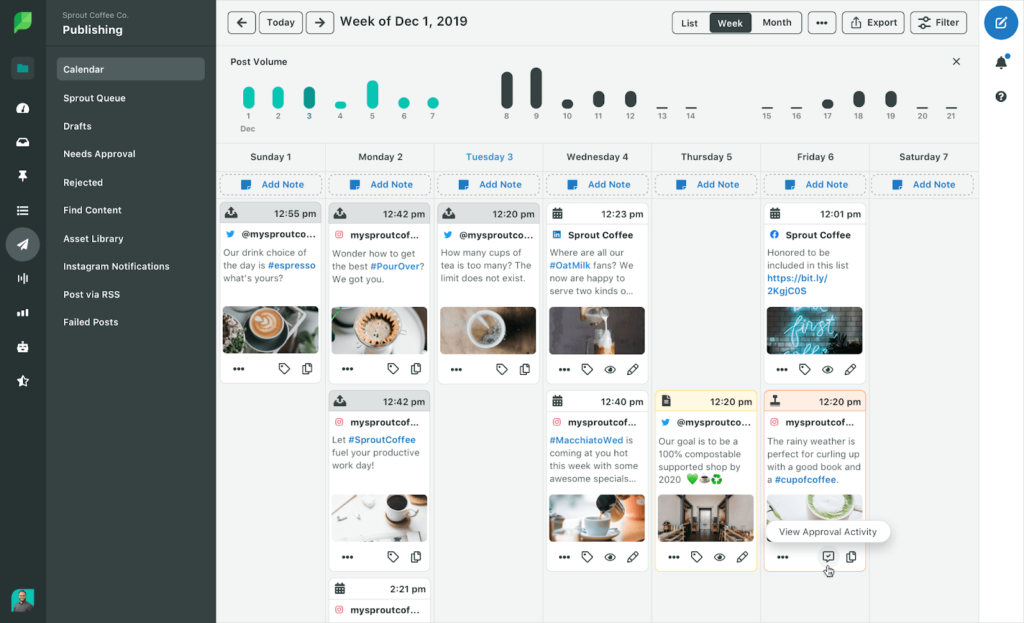
Sprout Social is the enterprise reference point: category-leading analytics, real social listening (as a paid add-on), and polish everywhere – it ranked #1 in 40 G2 Winter 2026 reports. The catch is that its economics were never designed for agencies: $199-399 per user per month billed annually, approval workflows only from the $299 Professional tier, and external client approvers only on the $399 Advanced tier, capped at three per account – your fourth client approver becomes a full paid seat. A 3-person team with client approvals costs more per month than most tools cost per year. (Pricing last verified: July 2026.) Best for in-house enterprise teams, not multi-client agencies. See how Kontentino compares to Sprout Social.
Later

Later remains a lovely tool for what it was built for: creator-led Instagram and TikTok content, with a best-in-class visual grid planner. The catch for agencies: it isn’t a multi-client workflow tool. Approval is a single-step Reviewer role on the Scale plan (~$82.50+/month), desktop-only and unavailable for Instagram Stories, there’s no external client portal, and the Social Set model makes multi-brand rosters awkward and per-seat costs add up. (Pricing last verified: July 2026.) Best for creators and single-brand visual-first teams. See how Kontentino compares to Later.
The honest take: which setup fits which agency
No single tool wins for every agency shape. The fair summary:
- Pick Planable if you run fewer than five high-touch clients and approval UX polish matters more to you than cost at scale
- Pick Kontentino if you’re a 2-20 person agency scaling past 5 clients and approvals, client roles, and predictable flat pricing are the bottleneck
- Pick Metricool if your clients judge you on reports, your budget is tight, and a basic approval flow is enough
- Pick SocialPilot if you’re a solo operator who lives in bulk scheduling and rarely needs client sign-off
- Pick Agorapulse if community management and inbox work are half your retainer and per-seat pricing fits your budget
- Pick Sprout Social if you’re an in-house enterprise team where listening depth beats per-seat cost concerns
- Pick Later if you’re a creator or single-brand team planning a visual feed, not an agency roster
And a migration reassurance, because “we can’t face moving everything” keeps more agencies on broken workflows than any feature gap: switching costs are front-loaded and smaller than they feel. Content calendars export and import, profile connections take minutes per client, and most tools will walk you through migration during the trial. The two weeks of mild disruption is usually repaid within the first month of not chasing approvals by email.
A weekly rhythm that holds ten clients together
Tools alone don’t manage clients – a cadence does. The structure that shows up again and again in well-run multi-client teams:
- Monday: pipeline review. One look at the all-clients dashboard: what’s scheduled this week, what’s still waiting for approval, what has no content assigned. Chase blockers first thing, not Thursday.
- Tuesday-Wednesday: batch creation. Create per client in focused blocks (client A morning, client B afternoon) rather than context-switching per post. Batching by client is the single biggest personal productivity lever in agency work.
- Thursday: approval push. Send next week’s content to clients in bulk, with the agreed SLA clock started. Automatic reminders do the nagging.
- Friday: reporting and housekeeping. Update dashboards, log wins for the monthly report, clear the trash bin, run the template audit.
- Daily, 30 minutes: engagement sweep. Comments and messages per client, timeboxed – or handed to whoever owns community management.
One manager running this rhythm inside a proper workspace-permissions-approvals setup comfortably handles 5-10 clients depending on content volume. The same manager without the system caps out at three and burns out at four.
Frequently asked questions
How do you manage multiple social media clients?
Give every client a separate workspace with their own calendar and connected profiles, control access with per-client permissions, run all approvals through one tracked workflow instead of email, template every repeatable task, and batch your work by client in a weekly rhythm. With that system, one manager can typically handle 5-10 clients; without it, even three clients generate constant coordination overhead.
How many social media clients can one person manage?
Most full-time social media managers handle 4-8 clients comfortably, depending on posting volume, how demanding approvals are, and whether community management is included. The ceiling is set less by talent than by tooling: managers with separate client workspaces, bulk scheduling, and automated approval reminders consistently handle roughly double the roster of managers coordinating through spreadsheets and email.
What is the best tool for managing multiple social media clients?
It depends on your bottleneck. Planable leads on approval UX for small rosters, Kontentino offers the strongest combination of multi-client workspaces, unlimited no-login client approvals, and flat pricing for growing agencies, and Metricool is the best value if analytics matter more than workflow depth. Per-seat tools like Sprout Social and Agorapulse are better suited to in-house teams than multi-client agencies.
How do agencies keep content for different clients separate?
Through workspace separation and permissions: each client’s posts, profiles, and media live in their own workspace, team members only access clients they’re assigned to, and client reviewers see only their own content. This prevents the two classic failures – publishing to the wrong brand’s profile and one client seeing another client’s unpublished work.
How do you get client approvals without giving clients full tool access?
Use a tool with a dedicated client role or no-login approval links. The client receives a link, sees only their own posts as they’ll actually look when published, and approves or comments from any device – without an account, without seeing internal comments, and without counting as a paid seat in tools that bundle approvers for free.
How much does social media management software cost for an agency with 10 clients?
At 10 clients (roughly 40 profiles and a 3-person team, annual billing), expect around $53/month on Metricool, €109/month on Kontentino Standard, roughly $145/month on SocialPilot with account add-ons, about $490/month on Planable’s per-workspace model, and $800-1,200/month on per-seat tools like Agorapulse or Sprout Social. The pricing model matters more than the sticker price: flat-bundle and bracket models stay stable as you grow, while per-workspace and per-seat models scale linearly with clients or headcount.
Should each social media client have their own workspace?
Yes. A workspace per client is the foundation of multi-client management: it eliminates cross-posting risk, keeps competing clients invisible to each other, lets you set a different approval flow per client, and makes reporting cleaner. The only setups that outgrow this rule are enterprise brands with many regional sub-accounts, which need workspace hierarchies rather than flat separation.
Run every client from one calm dashboard
Managing multiple social media clients stops being chaos the moment the system – not your inbox – carries the coordination. Set up a workspace per client, wire permissions to the client relationship, move approvals out of email, template the repeatable work, and pick a tool whose pricing won’t punish the growth you’re planning.
If that system sounds like the thing you’ve been duct-taping together across five apps, Kontentino was built by an agency to be exactly that system in one place. More than 4,000 brands run their content through it, and they rate it 4.7 stars on both G2 and Capterra. The free trial takes 14 days and doesn’t ask for a credit card.
Prefer to talk it through first? Book a demo and we’ll map the setup to your actual client roster – including an honest answer on whether another tool fits you better.